Advertisement

Share this:

Video result for Zshadow Create Account​

Z Shadow - Hack Facebook Account with Shadowave Phishing

top zshadowave.com

Z Shadow is an open source phishing tool for popular social media and email platforms. Z Shadow works by creating login pages via a specific crafted link and capturing user credentials upon entering.

117 People Used
More Info ››

Z-Shadow Hacker - Hack Facebook Account In Minutes For Free

trend zshadowhacker.com

To create an account on z shadow, click the sign up button and proceed. Now you will see a registration form for the sign up process. You will fill this form just like you do on any other website for creating an account and then you will sign up.

130 People Used
More Info ››

Z shadow login my account - Kawasaki India

top www.kawasakisports.in

Step 1: Login to your z shadow account which you have to create while signing up. So, it becomes difficult for facebook to ban the links. What is the official URL of the zshadow website? Step 2: Sign up for the zshadow account or sign in if you already have a zshadow account. Fist of all you need to log in to your z shadow account.

305 People Used
More Info ››

How to Create Z Shadow Account for free | z shadow hacker ...

best khalidalikhan.blogspot.com

HOW To Create Z Shadow Account First, all I will say you that creating z shadow account is not a rocket science read it and make your own best z shadow account you can use this account everywhere this is not illegal or you will not need to use any VPN just create it and don't use it for bad works because hacking is a completely illegal activity ...

197 People Used
More Info ››

Z Shadow .info Hacker|Hack Facebook & Instagram Free

best z-shadows.net

For this method, you will need to create an account on z-shadow. To do that, simply open the website and use sign up or registration menu of the site. Now you are done with the sign up, verify your ID from your email. Now since you are doing that for Gmail, make sure that you choose a bait or link which is there for Gmail accounts.

139 People Used
More Info ››

Z-shadow Easily Hack Facebook Account in Few Minutes

tip www.hackchefs.com

There are different ways to hack any particular Facebook account. In this article, you read z shadow links to hack email accounts, Facebook accounts, etc. z shadow secretly Hack your friends or someone else's Facebook account without letting them know.You can use the man in the middle attack, Phishing, Kali Linux. Kali Linux is an open-source project which provides the best information ...

95 People Used
More Info ››

Phishing Tools - Z Shadow - Hack Facebook Account with ...

tip zshadowave.com

Zshadow Alternative - Anomor Online Hacking Tool. June 29, 2020 Phishing Tools. ... This interesting option enables you to create an infected media device ... even letting you import users lists to send to any people you wish. It also lets you use a Gmail account for your email attack, or use your own server or open relay for mass delivery.

103 People Used
More Info ››

ZShadow | How hackers Hack Facebook and instagram easily

top myhackingworld.com

1)ZShadow. Step 1: Go to ZShadow official Website. And create an account using the fake email. Read our list of websites for fake mail….!!! Remember to use fake emails for zshadow facebook hack because using your actual email ids would be a bad idea since you might be tracked.

188 People Used
More Info ››

How To Hack Facebook Account Using ZShadow | Ethical ...

tip onehack.us

With the help of zshadow, you can hack facebook account using url. So for those who don't know about zshadow, it's basically a website used by script kiddies. Ohk! Let's have a short and sweet introduction to our friend zshadow. What is ZShadow? Zshadow is a website, where you can easily create fake phishing pages of social media sites ...

372 People Used
More Info ››

Z Shadow Hacker - Hack Facebook & Gmail In 2019 (In Few ...

hot itechgyd.com

What is Z-Shadow? Z-Shadow is a website specially designed for hacking Facebook and other social site like Facebook, Gmail and many more. You just need to create an account on that website and have to copy the URL of the site which your victim uses. For example if you want to hack Facebook then you just need to copy the URL of fake Facebook page.

391 People Used
More Info ››

Z Shadow APK - Z Shadow Hacker - Hack Facebook Account In ...

new zshadowhacker.com

how do i create an account here on z shadows for hacking account. bikesh April 19, 2018 Reply. why zshadow wesite is block in my country open it. google user April 29, 2018 Reply. sir your z shadow link is not working properly. khanhackers June 18, 2018 Reply. sir i wana do so but account doesnt opens.

281 People Used
More Info ››

Shadow Account - Log into your account

new sso.shadow.tech

Cookies Policy. This website uses cookies to provide you a quality user experience. You can change your preferences at any time. Manage cookies Accept Accept

295 People Used
More Info ››

How to Use Z Shadow in a simple way? - z-shadow

top z-shadows.net

Z Shadow or Z Shadow Hacker is a simple phishing website which assists you in hacking other people's Gmail, Yahoo, and Facebook account using a link as a bait. All you need to do is to sign up on the official website, make an account, verify it, choose a link, send it, and if the person falls to bait you get the hacked ID and pass.

291 People Used
More Info ››

How to Hack Facebook Account Using ZShadow

trend www.androidgigs.com

Step 2- Create an account on their website. Click on signup button in the menu. It's easy to create an account. Enter your email, username, and password that you would like to use.

87 People Used
More Info ››

How to Hack any Facebook Account with Z-Shadow - Haxf4rall

new haxf4rall.com

Hack Facebook account with Z Shadow Step 1. Go to Z Shadow Website- https://zshadowave.com. Step 2. Sign up for the z shadow account or sign in if you already have a z shadow account. Fill all the necessary details and click sign up. Step 3

340 People Used
More Info ››

Z-shadow.us passwords - BugMeNot

top bugmenot.com

Access and share logins for z-shadow.us. z-shadow.us logins Username: jamesam Password: khinmgsoemgk Other: Hack to hack anus

134 People Used
More Info ››

Z shadow login - ShoppnShip

hot www.shoppnship.com

Shadowave or Zshadow website relies on phishing techniques and sending links to victims. This tutorial is for educational purpose. The reason for this is that Google doesn't necessarily allow hacking apps to be available on its Play Store. Before moving forward, however, you will need to create a new account. and plzz reply me, how do i hack ...

414 People Used
More Info ››

Z shadow Expert Tips - How to Use z-shadow 2021 (Absolute ...

new www.hackchefs.com

You have to click on " sign up here " and then sign up for your account. Fill all the details in the signup form. Type your username, password, confirm your password, email, age, country. When your z shadow sign up form is completed.

125 People Used
More Info ››

Z Shadow - Home | Facebook

hot www.facebook.com

Create New Account. Not Now. Community See All. 15,741 people like this. 15,767 people follow this. About See All. zshadowave.com. Interest. Impressum. Page Transparency See More. Facebook is showing information to help you better understand the purpose of a Page. See actions taken by the people who manage and post content.

195 People Used
More Info ››

Z Shadow Hacker - How To Hack Facebook, twitter, Gmail ...

tip technolily.net

What is Z-Shadow? Z-Shadow is a website specially designed for hacking Facebook and other social site like Facebook, Gmail and many more. You just need to create an account on that website and have to copy the URL of the site which your victim uses. For example if you want to hack Facebook then you just need to copy the URL of fake Facebook page.

78 People Used
More Info ››

Useful Blogs

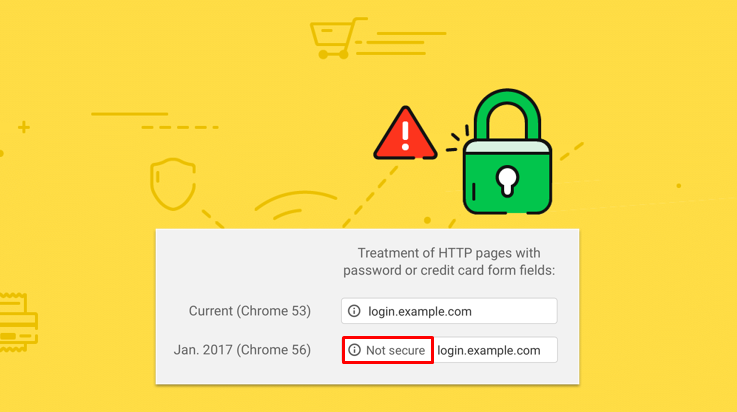
Things to Know When Entering Your Account to "Not Secure" Website

The 68 version of the google chrome browser introduced the latest" not secure" warning in the address bar. Furthermore, it can appear at any time when you are also visiting the insecure webpage. Moreover, the latest chrome version also has the pop when you view the click message that mostly explains. Moreover, your connection to the site is not secure well. However, you might have seen the warning sign on the site.  The "Not secure warning sign” The "not secure warning sign" means a lack of secure connection on that page. Moreover, it can be the alert sign that the information that can be received or sent with that page is unprotected and can be stolen, modified by the hackers, and read. There can be several other problems with the help of internet structures. Moreover, the "not secure warning sign" mostly means that your website is not safe due to the malware attack on that account. Furthermore, it is only to alert you that you can have secure connection problems with that page on the site on which you are landing.  Site owners do have the responsibility to check about the malware sign on that site, and there must be the site visitor that cannot change the implementation of the security measures. Moreover, this article will solve what is impossible and that the site owners have that the visitors can fix.  Warning Signs You need to note all the warning signs that have been appeared in different browsers. The not secure option mostly looks like on Firefox, Safari, and Chrome. Therefore, you need to look at the warnings when they appear in front of you. Unsecure Websites The un-secure websites mostly display the not secure option that can appear on every page using the HTTP protocols. It is because it is incapable of providing a secure connection. Moreover, this is historically the primary protocol for the internet connection that has been used. Furthermore, over the last years, most websites have been transitioning to HTTPS. Here the S means the secure websites. Moreover, it provides encryption and authentication. It is mostly used by millions of websites that include Amazon, Facebook, and others. You can protect the information while logging, browsing, and making purchases. Moreover, some websites can also support HTTPS connections, but not all mostly, it is because in some cases, insecure pages are not the priority. Moreover, if you are the visitor or the operator, or the website owner, then using the HTTP and this warning is here what you can do.  For Administrators/Owners of the Administrators The warning sign can be displayed on any page and can be served on the HTTP. Moreover, it is an unsecured protocol. If you are looking for a warning sign to operate or want to operate, you must resolve it by enabling your site's HTTPS protocol.  TLS/SSL Protocol After using the HTTPS with the help of SSL/TSL protocol, it can secure a secure connection that is both authenticated and encrypted. Moreover, the HTTPS helps you obtain an SSL/TSL certificate, and after then, you can install the certificate and enable the HTTPS protocol with the help of your web server. Moreover, if you do not have the HTTPS deployed at all, then you can also use the Wizard certificate that can help you to figure out which TLS certificate is important and what you need. Furthermore, your need can vary and depends upon how many domain names will operate you there if you want the business to get validated for the additional user trust. Furthermore, the review guide of the HTTPS assists you in supporting the HTTPS by default.  Furthermore, web browsers include Mozilla Firefox, Google Chrome, Microsoft Edge, and Apple Safari. Moreover, it will have an interface that will help you warn the users to get about the insecure pages. Therefore, it is important to support the HTTPS for optimal use and the experience's security benefits. In addition to this, several new web-technologies are required for HTTPS. Some of them can improve your website, as well.  For Website Visitors Note that the basic browsing over the HTTP like looking at the recipes and then reading the newspaper. You can look modified, monitored, and then recorded by entities, like the government or ISP. It ultimately means that you will not have any privacy for such pages. It is because of public WIFI networks like airports, coffee shops, and the additional risk from all the local attackers. Also, there are some other computers on that network. These are ultimately there to monitor and view pages you are looking at. What you are searching for while roaming around those pages.  Conclusion All in all, these are how you will know about how you can solve the login problems and the security issues happening at the time of login.
Read More

User Authentication: Understanding The Basics & Top Tips

The most important aspect of website users is the authentication of human to computer interactions. Hence, user authentication is important to understand when someone is creating a website login procedure. Therefore, whether you are looking to be up the internal security or increasing the customer acquisition, or providing a better experience for exploring your site, it is important to know about the authentication process basics. Therefore, we are presenting you with this guide. In this way, you can understand: With the help of better understanding, your organization can understand the better understanding. With the help of a better understanding, your organization can be more effective with the registration and the login processes that can go past the traditional offerings. Moreover, when you go for more different types of authentications, you can get several conventional offerings. Furthermore, when you go for more user authentications, you can get the passwords and more options with fewer alternatives. What can User Authentication Do? The authentication process is the security process that can cover the human to computer interactions that will require the login and can register there. Furthermore, simply the authentications can ask each user about "who are you?" and verifies the response. Moreover, when users can ask for the account, they must create a unique ID and the key that will allow them to access the account later. Mostly the password and username are used as the key and ID. However, the credentials that can include various types of user authentication as well. How Does the User's Authentication Work? The authentications are mostly interchangeable with two separate terms that can work together and create a secure login process. To put the user authentication, you must have three up to the mark tasks: Manage the user connection between the website user and the human user. Verify the identities of the users Decline or approve from the authentication so that the user can identify the user. Importance of User Authentication Understanding the user's authentication is important because it is the key step process that can keep unauthorized users access to every sensitive information. Moreover, they strengthen the authentication process because one user has sensitive information, and another user can only have access to that information if they want. Top User's Authentication Methods Some methods are also called the authentication factor, and for that reason, there are three types. Knowledge Factors: The foremost factor in this regard is the knowledge factor. It can be anything the password, username, and PIN. Furthermore, the challenge with such characteristics is that they can be weak in security because they can be guessed or shared. Possession Factors: Anything that the user must have to log in is the possession factor. Moreover, the one-time password tokens are sometimes the link. Furthermore, there can be physical tokens, ID cards, and possession factors. Inheritance Factors: For a person using the biological characteristics, it is known as the inheritance factor. It can be facial recognition and finger scanning. It can fall into the category. User Authentication with No Password Having the password-less login system is the authentication method that mostly does not require password authentication. Moreover, this sort of authentication has become more famous in the past years, and you are more experienced in the few. Moreover, the most common ways of password-less login in this article are the two most essential cover methods. Biometrics: Fingerprints, facial recognition, iris scanning, and other types of verification through biological characteristics fall under the category of biometrics that can be considered under the inheritance authentication factor. Email Authentication: Email authentication is the most important and password-less user authentication. It mainly because anyone with an email account can use this method. Stronger Password: We encourage you to get the improved security and the stronger vulnerabilities that they used to bring due to the insecure user-generated credentials. It can take to get the password-free online password experience. Implement SSO Authentication: If you do not know about or you can go for the single sign-on, with the authentication, it is a process that can make you logged into the account even when you. Multi-factor Authentication Strategy: Multi-factor authentication is the one that uses the identification with the help of several authentications. For instance, a user can input their password, username, which will then email the link to get the security code. Exploring the Password-less Authentication You can implement a password-less option of login to your website. Moreover, security to the passwords and the security experts can become unreliable and obsolete for user authentication. Furthermore, the password-less logins will not require anything to remember anything. Moreover, the login process is completed with the help of the biological characteristics or through another account. Way to improve user authentication To make your login process more secure, user-friendly, you should know how to create stronger passwords to improve security. As we know, that passwords are not completely safe, they have various vulnerabilities, still, migrating the entire internet to a completely password-free online experience will take your long time. The best way is to create better passwords. Conclusion All in all, this is the best way to authenticate the password to get the optimum security. If you are going to apply the above-discussed user authentications and the given tips you can secure your system.
Read More

Troubleshooting Zoom Login Errors

Zoom is an excellent tool for working with millions of users every day. Given Zoom's value in today's remote working environment, it is easy to understand why users fear logging difficulties. All the tension and anxiety go through the roof if just a few minutes remain before this vital video conference begins and you cannot log in. The errors 403, 1044, 100, and 5003 are the most widely found zoom login errors. The good news is that Zoom login problems and errors with this guide can be fixed easily. How to solve zoom in issues Check your credentials with a different computer. As a fast solution, you can log in using your phone if logging in is not working on your device. Or try logging in with your browser if you are unable to login with the desktop app. Of course, you can search for typos with proper credentials. If you sometimes switch between different languages, check your keyboard input settings. Don't use some other authentication method to use the authentication details your company has given to you. Link to SSO SSO should be used, and the credentials of the company signed in. To work with this tool, you need a corporate or educational account and a verified Vanity URL. Type the name of your organization into the Continue domain area. Enter the credentials of your company, and I hope you can log into it. Check your protection and link configuration. You could not log into your Zoom account with insecure network access or firewall and software blocking protection settings. To ensure that your internet connection works properly, restart your modem, receive recent router firmware updates, and, if necessary, with your current setup, switch to a cable connection. Check your firewall and antivirus settings and make sure no Zoom or Zoom functions are disabled. Open and go to Update & Protection for the Settings Function. Pick Virus & Threat Defense to navigate to Windows Security. Add Zoom to it and retry in Windows Firewall Whitelist Zoom. Go to Start, form a firewall, open Network Security and Firewall. Click on Make the app by firewall. Scroll down. Press Change Settings, scroll down to Zoom, and pick the public and private checkboxes. Restart the machine, start Zoom, and check to see if you can log in now. You should go to your support page for specific instructions about zooming in a zoom list if you are using third party firewalls and antivirus. Check if Zoom Login is blocked  Zoom may interact with another program. If this has happened soon after new software has been installed on your device, disable or uninstall the program and then verify that the Zoom program is now effective. You can deactivate all background apps with the Task Manager or clean the boot to ensure a problem with software intervention. They are not working webcam or audio Nothing is more frustrating than to have a Zoom call from your webcam or audio. Try any of these simple tips first if your web camera is not shown or is selected but not running. Test the zoom setup If a meeting ID is shown just before a call is entered, leave the following settings unchecked. Do not audio-connect. It enables you to link a call to your audio and video automatically. Leave other similar applications Make sure all other programs that use the webcam are closed if your webcam does not appear. If another program currently accesses the Camera, the zoom will not be able to use.  Audio and video testing You can test your audio and video in zoom by clicking on this link when your Camera or audio does not function. When you have opened up, you can enter a Zoom App test call and follow the screen directions. You can also pick your webcam by clicking the Start video (It might say Stop videos if you are in a call) on the bottom toolbar while you are on the Web (or double-check your webcam in the main Zoom app). If the screen is blank, you can click on the arrow next to the camera icon and select the same as a device or a unique webcam from the list or see the integrated Camera. Check PC configuration The issue might not be at all Zoom sometimes. The webcam can be blocked while you are on Windows 10 or Mac. Through testing the application permissions, you can correct that by making sure your Camera can be used by the Zoom app or your web browser. You can also verify this on the Web directly by restarting the call and pressing Allow if the camera and microphone access are prompted. 10 Windows Enter the search box for "Webcam" and pick from the menu which applications you can access your Camera. Scroll down, and the Microsoft Store and desktop applications that can use your webcam will be shown. You need to ensure that the button Allow Desktop Apps to Access Your Camera switches to the on position for non-Microsoft Store applications. You may also check for the microphone and pick the microphone's Privacy Settings to do the same thing. macOS Select Security and Privacy and Open Machine Preferences. Click on the Lock button and enter the change password. Then you can click on the sidebar on Camera and check your Web browser and Zoom. And you want to make sure that the box is tested for the microphone.
Read More

Face ID VS Fingerprint: Which Is More Secure?

Our data is the most precious asset for us. We have to keep it safe from cybercriminals. Therefore, we must know about security apps to protect our phone and personal data. Now the question is: Face ID VS Fingerprint; Which is more secure? And which one is to be chosen?  Fingerprints are the security key Rather than most of us rely on two critical elements of our fingerprint data that only we possess and no one else. There are two main options for those who are looking for an app to secure their devices that entirely rely on Face ID. As we know, face ID has its benefits as well as drawbacks, fingerprint also owns many benefits, drawbacks you should know. The Apple iPhone has long had Touch ID. It has a fingerprint sapphire crystal sensor which unlocks the phone only if the pattern matches. This kind of match used not just the whirl of your fingerprint. It also includes the location of your skin's clear pores to ensure that it was you who was trying to access the device. However, Apple removed the home button with the iPhone X, which can open your phone with a fingerprint. Despite it, Apple offered something unique that is Face ID.  The security level of Face ID Apple demanded a sleek front phone and removed the home button that had been the base of the device since its starting. Then it offered an alternative that was more simplistic, but few argue less secure. The owners of the mobile point at camera, face, and unlock their smartphones rather than using a fingerprint. Furthermore, it is designed to be a friction-free process. However, this one is considered less secure. Research has proven that it is possible for strangers who have similar facial features got success in gaining access to your phone. The reason is simple because the technology works on a lower resolution.  Unlike fingerprints, facial features are not at all unique.  Researchers somehow managed to use social media pictures to spoof facial recognition security. It was done even before Face ID was released. This process is more straightforward than creating fake fingerprints. However, face recognition is considered to be better than no protection at all, but it is not relatively more secure than Touch ID. Reliability It is improbable to have as catastrophic consequences as many fears. Most accidental unlockings are likely to happen between family members instead of a criminal managing to obtain access. Therefore, the reality is that facial recognition is less reliable than fingerprints for gaining access to phones and devices.  On the other hand, fingerprints have also proven to be get hacked. The fingerprint is strong enough to protect users from ordinary or opportunistic attackers which is substantially better than nothing. Moreover, if you are after quick and easy access to your phone as well as happy to trade off some security for that, then, in this case, relying on Face ID is a good alternative. However, you have to be just careful while storing vital information on your phone, which anyone could access. Authentic Security System Both Face ID, as well as fingerprint, is secured as declared by Apple. However, for the most part, that is true too. It is sporadic that a random person could unlock your phone. However, that is not the only type of attack to worry about it. While using different biometric authentication methods; Face ID and Touch ID are very similar in functioning.  When you try to log in to your iPhone either by pointing your face at the camera on the front, or you put your finger on the touch sensor, the phone immediately compares the biometric data. It reaches and detects the data that is saved in the Secure Enclave. Furthermore, there is also available a separate processor that's entire purpose is to keep your phone safe and secure. Your iPhone unlocks if the face or fingerprint matches. If not, the message will be prompted to enter your passcode. Nothing Protects You from the Government Agencies Nevertheless, any security app can ever truly protect you from a determined government agency with virtually unlimited resources who want to get access to your phone. Not only can they legally bound you for using Touch ID or Face ID to unlock your phone, but they also have access to tools like the GreyKey. Greeley can crack any iOS device passcode that will make fingerprint and Face ID useless for you. Fingerprint and Face ID are incredibly convenient, and if they are backed up with a strong passcode, then it is secure for daily use by everyone. However, they might not protect you for long if you are the target of a determined hacker or government agency.  Conclusion Both fingerprint and face ID is secure, but the fingerprint is more secure as compare to face ID. Anyone who has the same facial features as you can get access to your phone if you are using FaceID. Fingerprint ID is said to be unique as compare to FaceID.
Read More

Video result

We found a lot of relevant information for Zshadow Create Account​. We provide the official link and a number of helpful pages for the login above. They are reliable sites collected by LoginNote. Please check it thoroughly!

How do you collect the data for Zshadow Create Account​?

We prioritize finding the official login links for all searches. Besides that, relevant information such login instructions, requirements, and accounts may be also given.

Are the login pages suggested for the search 'Zshadow Create Account​' safe?

We collect data from third party websites. These sites are selected based on their high trustworthiness. However, we cannot make any guarantees about safety when you are at risk by using those sites.

I have an experience about Zshadow Create Account​, how can I send you?

That’s great. It is certain that your login experience is very valuable for other users. We will really appreciate if you can share it with us.

What information of Zshadow Create Account​ will be provided besides the login link?

For each search from the user, besides the login link, we also provide relevant information such as register guiding, requirements, and accounts. It is similar to the search 'Zshadow Create Account​'.